
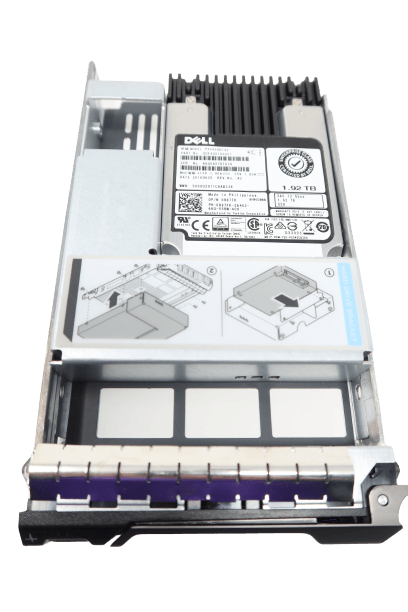
For businesses and IT professionals using Dell servers, storage capabilities can make a significant impact on performance and efficiency. While traditional hard drives have long been the backbone of server storage, they're increasingly being outperformed by modern Solid State Drives (SSDs), which offer faster data access speeds, improved reliability, and better energy efficiency. Whether you're looking to boost your existing system or starting fresh, integrating 1.92TB SAS SSD and SATA solutions into your Dell server can be transformative.
The Evolution of Dell Server Storage
For many years, hard drives have been sufficient for data storage needs. However, with increasing demands for speed and reliability, particularly in enterprise environments where downtime translates to substantial financial losses, it's crucial to consider upgrading to SSDs. Installing a high-capacity, performance-driven SSD can significantly reduce data access times and enhance the overall performance of your Dell server.
Why Choose SSDs for Your Dell Server?
- Superior Speed and Performance: Compared to traditional hard drives, SSDs offer substantially faster data read/write capabilities. This is essential for businesses running large-scale databases or those that need rapid access to data files.
- Reliability and Durability: SSDs have no moving parts, reducing the risk of mechanical failure and data loss. The 0R87FK PX04SRB192 Dell 1.92TB 12G SAS MLC SSD is a prime example of this, boasting a 2.5 Million Hour Mean Time Between Failures (MTBF) rating, ensuring uninterrupted service.
- Higher Capacity per Drive: With options like the 1.92TB capacity, these drives are ideal for those who need large storage capacities without compromising on performance.
- Improved Energy Efficiency: SSDs generally use less power than their traditional counterparts, making them an eco-friendly choice that can also help in reducing operational costs.
SAS vs. SATA: What's the Difference?
When considering an upgrade, you may wonder whether to opt for SAS or SATA SSD solutions. Both have distinct advantages depending on your specific needs:
- SAS (Serial Attached SCSI): These are designed for high-performance and high-availability applications. They provide faster data transfer speeds and are more robust under high-end workloads. The Dell 1.92TB 12G SAS MLC SSD is perfect for businesses requiring intensive data handling and storage tasks.
- SATA (Serial ATA): Typically, SATA drives are more suited for less-intensive applications, offering a cost-effective solution for large storage needs while still delivering good performance.
Making the Switch
Transitioning from traditional hard drives to SSDs is a strategic move that can yield long-term benefits. By integrating drives like the Dell 1.92TB 12G SAS MLC SSD, businesses can enhance their server’s capabilities, ensuring they stay competitive in dynamic markets.
For more information and to explore a wide range of solutions tailored for Dell servers, visit ServerDiskDrives. Equip your systems with cutting-edge storage technology and propel your business into the future of computing.